Podcasts
Episodes at −16 LUFS for Apple Podcasts, whole seasons in one pass. The leveler evens out a quiet interview guest before normalizing.
Audio Normalizer measures and normalizes audio and video files per ITU-R BS.1770-4 — to the loudness of your references or the standard of your platform. With video, the picture track stays untouched. Editorial precision. Sandbox-safe. In 39 languages.
Audio Normalizer is a Mac app that brings audio and video files to a loudness target in LUFS — for anyone who has to hit a loudness spec rather than adjust by ear.
Episodes at −16 LUFS for Apple Podcasts, whole seasons in one pass. The leveler evens out a quiet interview guest before normalizing.
Full ACX check for Audible: RMS between −23 and −18 dB, peaks below −3 dB, noise floor below −60 dB, 44.1 kHz and room tone at the start and end.
Exports from Final Cut Pro, Premiere or DaVinci Resolve as MP4, MOV or M4V: only the audio is normalized, the video track is not re-encoded.
EBU R128 (−23 LUFS), a dialogue gate as Netflix requires, measurements in the Broadcast Wave chunk per EBU Tech 3285 and a PDF report with loudness curve as proof.
Album mode with one shared gain, ReplayGain track and album tags, platform check against Spotify and YouTube (−14 LUFS).
Watch folders, Shortcuts, Siri, AppleScript and a Finder service — the app normalizes without anyone opening it.
A calm, focused app for a technically demanding task. Not a thousand options — only the ones that matter.
Integrated loudness per ITU-R BS.1770-4, true peak and loudness range per EBU Tech 3342. After each run a curve shows the loudness across the whole file.
To the Apple Podcasts standard (−16 LUFS), a preset of your own like “Podcast mono −19” or any target. With true-peak limiting — no overshoots, ever — and a before/after preview at matched loudness.
Whole folders in one click. Queue persists across app restarts — no lost progress, no broken workflow.
Fully localized interface. Live switching without restart. Fallback system for incomplete translations.
WAV and AIFF stay lossless PCM, FLAC stays FLAC, ALAC stays ALAC, MP3 stays MP3 — gain applied losslessly, without re-encoding; if a file needs the limiter, it becomes M4A. Tags, cover art and chapters carry over. With MP4, MOV and M4V only the audio is touched — the video track is copied byte for byte, without re-encoding.
Native macOS notifications when a batch completes. Processing runs quietly in the background.
Shows before and after each run whether the file fits Spotify, YouTube, Apple Podcasts, ACX and EBU R128. One click adopts the target. ACX is checked in full: RMS, sample peak, noise floor, sample rate and room tone.
One shared gain for every track: the album hits the target while the level differences between tracks stay intact.
Every value from the session as PDF, CSV or RTF, the PDF with a before-and-after loudness curve. Copy and paste it into Numbers, Pages or Notes, share it, print it. Every normalized WAV also carries its measurement itself — in the Broadcast Wave chunk per EBU Tech 3285.
The leveler brings quiet and loud voices together before normalizing — for interviews with a guest further from the mic. Pauses are not pulled up.
Measure loudness on speech only and normalize to it, as Netflix and many broadcasters require. Speech detection runs on your Mac, offline.
Write track and album tags to MP3, FLAC and M4A without touching the audio — the file stays identical sample for sample. For music libraries and DJs.
Audio Normalizer doesn't only live as an app. It works in AppleScript workflows and right in the Finder context menu.
Integration with Script Editor, Automator, and third-party apps. Audio becomes part of your workflow.
tell application "Audio Normalizer"
  normalize file "audio.mp3"
end tell
Right-click any audio file → Normalize. Directly in the macOS context menu and Quick Actions.
Finder → Right-click →
  Services → "Normalize Audio"
Voice control and automation, in your Mac's language. Say "Normalize for Spotify with Audio Normalizer" — target and peak ceiling come from the platform. Siri understands your own presets by name, too, and knows which file is on screen.
Shortcuts →
  Audio Normalizer → Normalize Audio
Three views, one promise: no distraction. The Henry Bauer designsystem makes room for the task.
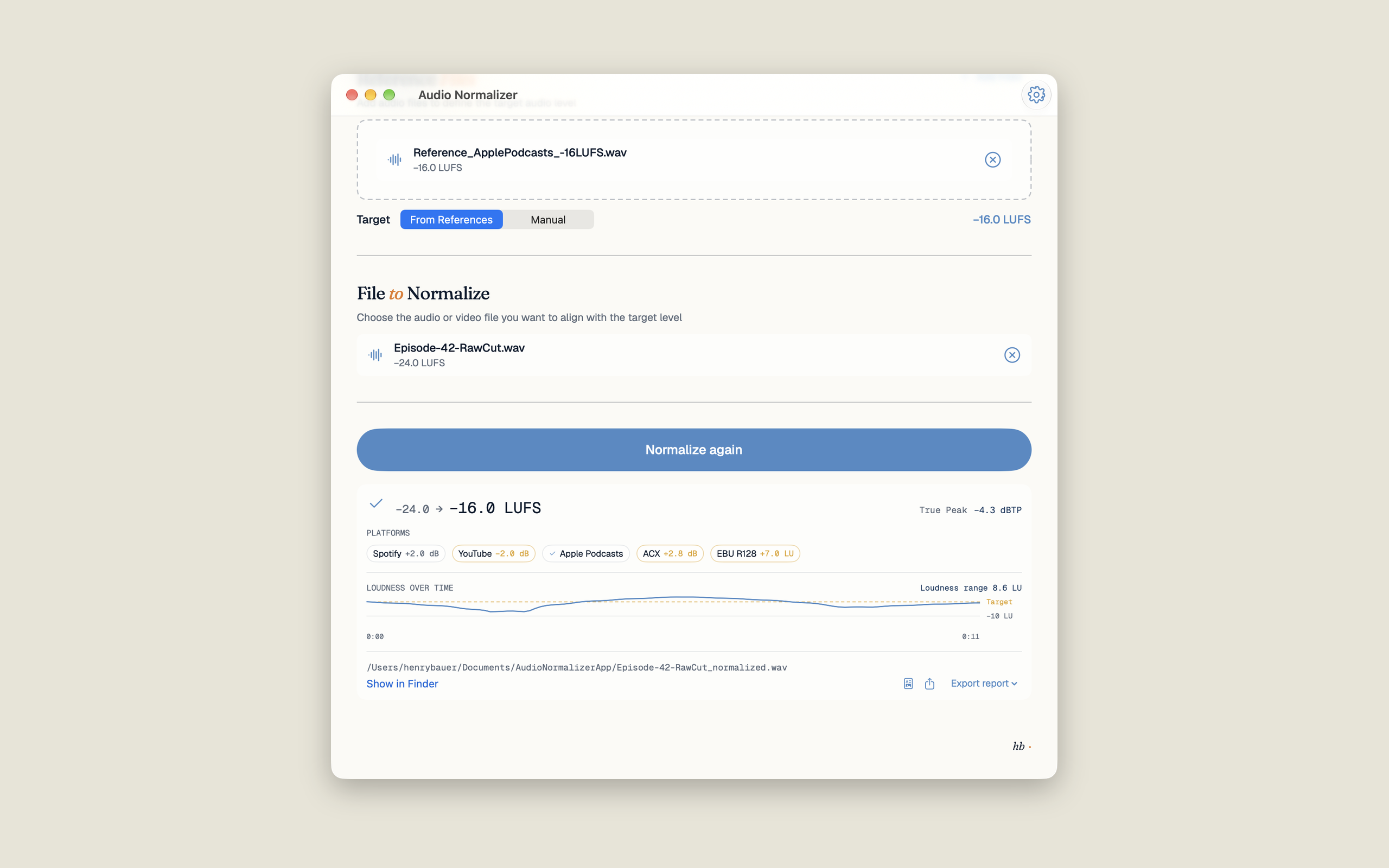
Before, after, true peak — with the platform check and the loudness curve across the whole file.
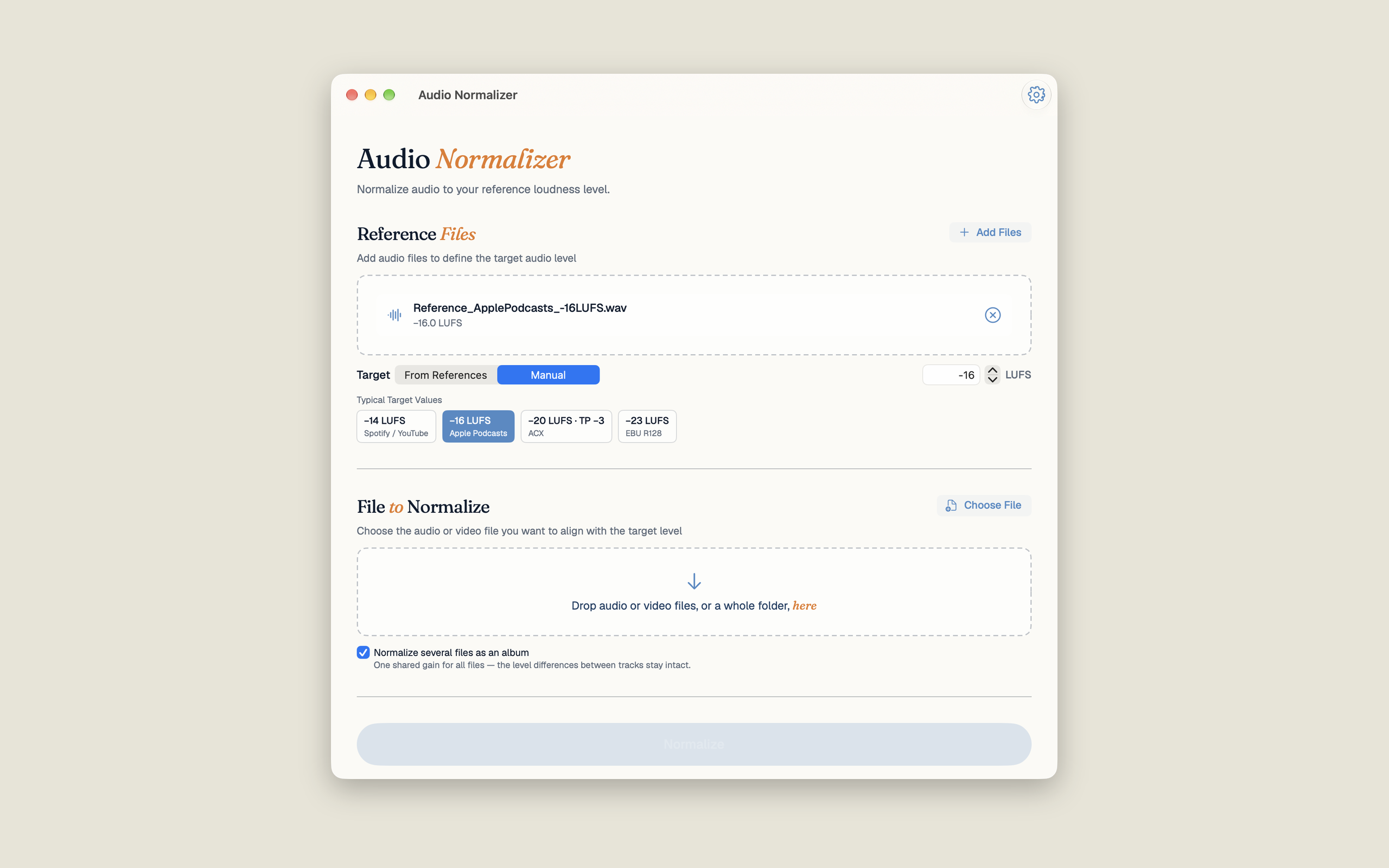
Four presets — or your own value. With album mode every track shares one gain.
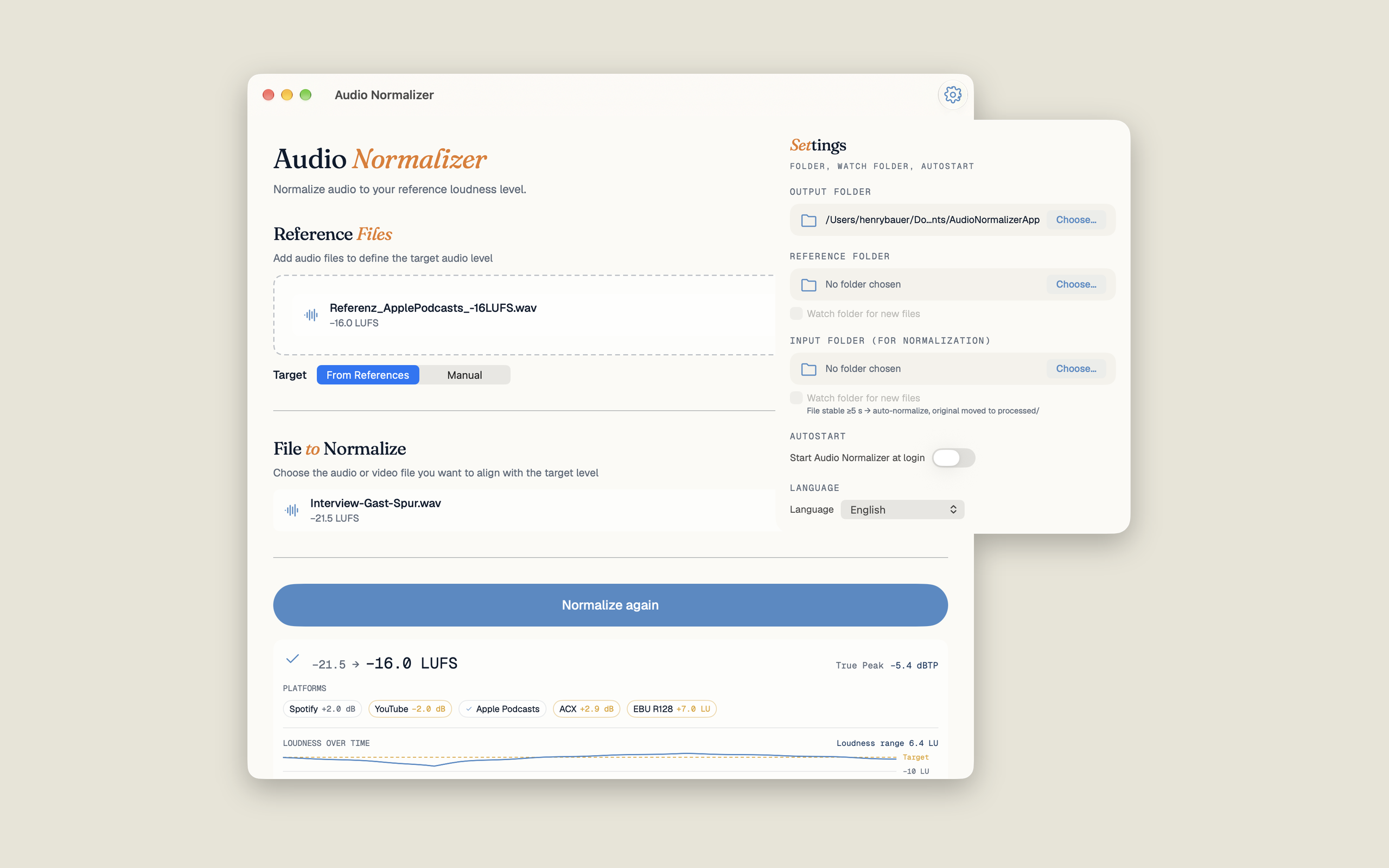
Three folders for input, reference and output. Watched folders normalize new files by themselves.
There are many loudness tools. This overview shows how they differ in principle.
| Tool | What it does | How Audio Normalizer differs |
|---|---|---|
| Loudness meters e.g. Youlean Loudness Meter | Measure LUFS, often as a plug-in in the DAW | Measuring alone does not change the file. Audio Normalizer measures and normalizes in one step, whole folders too. |
| MP3Gain and ReplayGain tools | Even out MP3 files via ReplayGain | Audio Normalizer works to a LUFS target per ITU-R BS.1770-4, for all common audio and video formats, and writes ReplayGain tags as well. |
| Cloud services e.g. Auphonic | Process uploaded files on a server | Audio Normalizer works only on your Mac, with no upload and no billing by the hour. |
| Audio editors e.g. Audacity | Loudness file by file in the editor | Audio Normalizer is built for batches, video and automation: folders, queue, Shortcuts. |
| ffmpeg loudnorm | Free, in the terminal | Same measurement standard, but with an interface, platform check, report and without re-encoding the video track. |
| Pro suites e.g. iZotope RX | Restoration, denoising, mastering | Far more tools at a far higher price. Audio Normalizer only does loudness, and keeps it simple. |
Not the right app if you want to remove noise, meter live inside your DAW, work on Windows or Linux, or need OGG, Opus, MKV or MXF.
Drag the episode or the whole folder into Audio Normalizer, choose the “Apple Podcasts (−16 LUFS)” preset and click Normalize. The app measures integrated loudness per ITU-R BS.1770-4, raises or lowers the file to −16 LUFS and keeps peaks below −1.5 dBTP with a true-peak limiter. −16 LUFS is what Apple Podcasts and most podcast platforms recommend for stereo.
Spotify and YouTube play back at around −14 LUFS, Apple Music and Apple Podcasts at around −16 LUFS. ACX (Audible) requires an RMS level between −23 and −18 dB. European broadcast follows EBU R128 at −23 LUFS, US television ATSC A/85 at −24 LKFS, Netflix −27 LKFS measured on dialogue. Audio Normalizer has presets for the most common targets; any other value can be typed in and saved as a preset of your own.
Audio Normalizer checks every technical ACX requirement: RMS between −23 and −18 dB, peaks no higher than −3 dB, noise floor no higher than −60 dB, a 44.1 kHz sample rate and 0.5 to 1 second of room tone at the start and 1 to 5 seconds at the end. The platform check shows before and after normalizing which point passes and which does not. MP3 files stay MP3 as long as the limiter does not have to step in.
Drag the MP4, MOV or M4V file into Audio Normalizer. The app normalizes only the audio track and copies the video track byte for byte, without re-encoding it. Several audio tracks, say German and English, are each brought to the target individually. Chapter markers and rotation are preserved.
Peak normalization raises the file until its loudest peak reaches a value. That says little about how loud it sounds. LUFS normalization per ITU-R BS.1770-4 measures perceived loudness across the whole file, so two files at the same LUFS value sound equally loud. Streaming services and broadcasters work with LUFS.
Drag a folder into the app or set up a watch folder: every new file in it is normalized automatically. The queue survives restarts, and a notification tells you when the batch is done. Album mode gives every track one shared gain, so the differences between them stay intact.
Audio Normalizer is a one-time purchase in the Mac App Store, $5.99 in the US and €4.99 in Germany. There is no subscription, no ads and no in-app purchase. Updates are included.
No. All measurement and processing happens on your Mac. The app has no network entitlement, collects no data and contains no trackers. Speech detection for the dialogue gate runs locally too.
No. Audio Normalizer is Mac-only, for macOS 14 Sonoma or later, on Apple Silicon and Intel. The interface is translated into 39 languages.
The app measures per ITU-R BS.1770-4 with K-weighting and gating, true peak with 4× oversampling, loudness range per EBU Tech 3342 and momentary loudness per EBU Tech 3341. The values were cross-checked against ffmpeg ebur128 during development.
One-time purchase in the Mac App Store · $5.99 / €4.99 · No subscription · No ads · Updates included